
Stop Losing Track of Your
Form Submissions
The Entry Tags Addon gives you a powerful tagging system to label, categorize, and organize every form entry — so you can filter, prioritize, and act on submissions in seconds, not hours.
Your inbox is full. Your submissions list is chaos.
Every day, form entries pile up in your WordPress dashboard with zero context. Which ones are leads? Which need a callback? Which were already handled? Without a way to label and sort them, you end up reading every entry just to find the one you need — and things slip through the cracks.
Sales leads sit mixed in with support requests. Urgent submissions get buried under low-priority feedback. Your team wastes time digging instead of doing. That's not a workflow — it's a pile.
The Entry Tags Addon solves this. Attach meaningful, color-coded labels to any submission, filter your list to show only what matters right now, and build the organized entry workflow your forms always needed.
Before Entry Tags vs. After
See exactly how your submission workflow transforms once you have a real tagging system in place.
Submissions in chaos
- Every entry looks identical in the list
- You open each submission to figure out what it is
- Leads get mixed with support and spam
- Urgent requests slip through the cracks
- No way to filter by priority or status
- Team members duplicate work or miss entries
A workflow that flows
- Color-coded tags show context at a glance
- Filter to show only what you need right now
- Leads, support, and feedback clearly separated
- Urgent items always visible and actionable
- One-click filtering by status, priority, or category
- Team sees who's handling what — no overlap
Everything You Need to Organize Form Entries
A complete tagging system built right into your Auto Form Builder — no third-party tools, no complicated setup.
Custom Tag Manager
Create unlimited tags with custom names, descriptions, and colors. Edit or delete tags at any time. A live statistics panel shows total tags, active tags, most used tag, and total tagged submissions at a glance.
Color-Coded Labels
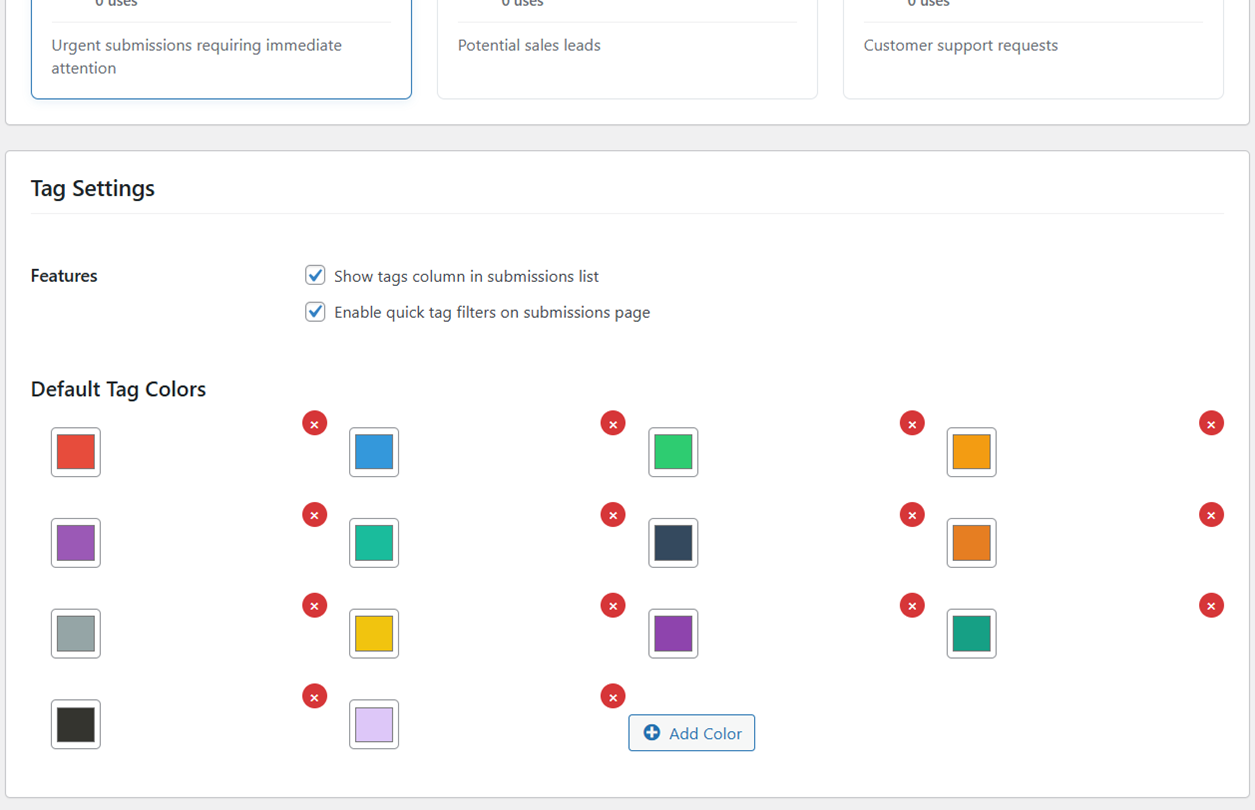
Every tag gets its own color — choose from a customizable palette or define your own hex values. Visual labels make it instantly clear which submissions are leads, which need follow-up, and which are complete.
Quick-Filter by Tag
Filter your entire submissions list to show only entries with a specific tag — in one click. Perfect for morning triage, weekly reviews, or pulling all leads for your sales team in seconds.
Tags Column in Submissions List
Enable a dedicated Tags column in your entries table so you can see what tags are attached to every submission without opening each entry individually. Your team sees context at a glance.
One-Click Tag Templates
Get started immediately with three built-in tag templates: CRM Workflow (New Lead, In Progress, Converted, Lost), Support Tickets (Urgent, Normal, Resolved), and Content Types (Contact, Feedback, Question). Apply any template in one click.
Quick Actions Panel
Batch-create Priority Tags, Status Tags, or Category Tags with a single button. Clean up unused tags automatically. Pre-configured quick actions save setup time and keep your tag library tidy.
Built Specifically for Auto Form Builder
Not a generic CRM bolt-on. Not a third-party integration that breaks. A native addon designed for your workflow.
Native WordPress Speed
Runs inside your WordPress admin with no external API calls. Tags load instantly because they live in your own database.
No Third-Party Tracking
Your submission data never leaves your server. No external services, no data leaks, no privacy concerns. 100% on your own infrastructure.
Zero Learning Curve
If you can click a button, you can use Entry Tags. The interface lives where you already work, with no new dashboard or login to learn.
Visual Insights
The Tag Statistics dashboard shows total tags, most-used tag, and tagged submissions count — track what your team works on most.
Save Hours Every Week
Stop scanning every submission. Quick-filter to show only what matters and process entries 5–10x faster than manual sorting.
Smart Defaults
Start fast with three pre-built templates and Quick Action buttons that create entire tag sets instantly. No blank-page paralysis.
What Your Tagged Submissions Look Like
Color-coded tags make your submission list readable in seconds — no clicking, no guessing.
Clean, Intuitive — Right Inside WordPress
No external dashboards. No new logins. Everything lives inside your existing WordPress admin.

How It Works
From purchase to your first tagged submission in under five minutes.
Install & Activate
Download the addon after purchase, upload it to WordPress, and activate it — just like any plugin.
Create Your Tags
Use a built-in template or create your own custom tags with colors and descriptions that match your workflow.
Tag Submissions
Open any form submission and assign one or more tags in seconds using the Manage Tags modal.
Filter & Act
Use quick-filter buttons on the submissions page to instantly see only the entries that need your attention.
Built for Every Team Using WordPress Forms
Whether you're managing leads, support requests, or content submissions — Entry Tags brings order to your workflow.
Sales & Lead Management
Tag contact form submissions as New Lead, In Progress, or Converted. Your sales team always knows exactly where each prospect stands.
Customer Support Teams
Label support requests Urgent, Normal, or Resolved. Filter to show only open tickets and never miss a critical issue again.
Agencies & Freelancers
Manage multiple client inquiry forms with separate tag sets. Keep project requests, partnership inquiries, and quotes clearly separated.
Content & Editorial Teams
Tag article pitches, feedback forms, and reader questions by type. Route them to the right team member instantly.
E-commerce Businesses
Categorize order inquiries, return requests, and partnership applications. Process the right entries at the right time.
Schools & Organizations
Label applications, event registrations, and survey responses. See at a glance which applications have been reviewed or are pending follow-up.
Loved by Teams Who Manage Form Submissions
Real feedback from agencies, support teams, and small businesses using Entry Tags every day.
"Before Entry Tags I was opening every single contact form submission to figure out what it was. Now I tag leads as soon as they come in and my sales team filters their view to only New Leads. Saves us at least 30 minutes a day."
"The CRM Workflow template was perfect for us. One click and we had New Lead, In Progress, Converted, and Lost tags ready to go. The color coding makes it impossible to miss a hot lead in the list."
"Simple, fast, does exactly what it says. We use it to mark support tickets Urgent or Resolved and the quick filters mean our team always sees the open ones first. Best $19 we've spent on a WordPress addon."
Try Entry Tags Risk-Free for 30 Days
If the addon does not work for you for any reason within 30 days of purchase, send us a quick email and we'll refund every cent — no forms to fill, no questions asked, no hard feelings. We can only build great products by standing behind them completely.
One Low Price. All Features Included.
No tiers. No feature gating. Everything in the addon is available from day one.
Entry Tags Addon
per year · renews annually
Full access to all features, updates, and email support for 12 months.
Frequently Asked Questions
Everything you need to know before you buy.
Ready to bring order to your form entries?
Join hundreds of teams who use Entry Tags to manage submissions faster and smarter.
