Premium Addon β€” Auto Form Builder

Send Every Form Submission Straight Into
Google Sheets

Stop exporting CSVs. Stop copy-pasting entries. The Google Sheets Integration Addon syncs your form submissions to any spreadsheet in real-time β€” using enterprise-grade Service Account authentication that works 24/7 without re-logging in.

See Features
30-Day Money-Back Guarantee Real-Time Sync Service Account Security
Real-time sync Per-form ON/OFF toggle Custom field mapping Auto column headers Service Account auth Unlimited submissions Works 24/7
∞
Unlimited Forms
24/7
Always-On Sync
<10min
Setup Time
30-Day
Refund Guarantee

Form data trapped in WordPress is data you can't use.

You collect leads, registrations, orders, and feedback through your forms β€” but the data sits inside WordPress. To analyze it, share it with your team, or feed it into other tools, you have to export CSVs, clean them up, and re-upload them somewhere else. Every. Single. Time.

Worse, "free" connectors often rely on personal Google logins that expire, break when someone leaves the team, or stop working after Google updates its security policies. You're left chasing OAuth errors instead of growing your business.

The Google Sheets Integration Addon ends this. Submissions land in your spreadsheet the second they're submitted β€” using a Service Account that never expires and is never tied to any individual person.

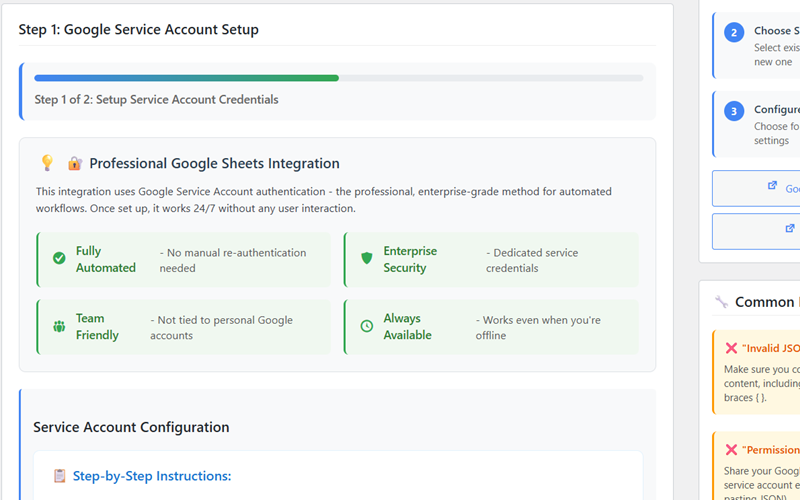
Professional Google Sheets Integration with Service Account Authentication

This integration uses Google Service Account authentication β€” the professional, enterprise-grade method recommended by Google for automated workflows. Once set up, it works 24/7 without any user interaction, manual logins, or expired tokens to chase.

Fully Automated

No manual re-authentication needed

Enterprise Security

Dedicated service credentials

Team Friendly

Not tied to personal accounts

Always Available

Works even when you're offline

The Difference

Manual Exports vs. Real-Time Sync

See what changes when you stop moving data by hand and let the integration do the work.

Without the Addon

Stuck in CSV hell

  • Export submissions to CSV manually every week
  • Clean and reformat the data before importing
  • Re-upload to Google Sheets and fix column mismatches
  • OAuth tokens break every few months
  • Personal Google login dies when team members leave
  • Dashboards and reports always run on stale data
With the Addon

Always-fresh data, hands-free

  • Submissions appear in Google Sheets in seconds
  • Column headers and field mapping handled automatically
  • Service Account never expires β€” set it and forget it
  • Choose which forms sync, leave the rest private
  • Reports, dashboards, and Looker Studio always live
  • Onboard new team members without breaking the sync
What You Get

Everything You Need to Sync Forms to Sheets

A complete, professional integration built right into your Auto Form Builder dashboard β€” no Zapier, no Make, no monthly subscriptions per zap.

⚑

Real-Time Sync

Form submissions arrive in your Google Sheet within seconds of being submitted. Each new entry appears as a fresh row at the bottom of your spreadsheet β€” no delays, no batching, no manual triggers.

πŸ”˜

Per-Form ON/OFF Toggle

Choose exactly which forms sync to Google Sheets. Toggle each form on or off independently. Keep contact forms public-facing while internal forms stay private β€” full control with one click.

πŸ—ΊοΈ

Visual Field Mapping

Click "Configure Mapping" on any form to match form fields to spreadsheet columns visually. Reorder, exclude, or rename β€” your spreadsheet structure is exactly what you need it to be.

πŸ“‹

Auto Column Headers

The addon automatically creates column headers in row one using your form field labels. No manual setup. Use an existing spreadsheet or let the integration generate the structure for you.

πŸ”„

Batch Processing Mode

For high-volume scenarios, switch from Real-Time to scheduled bulk transfers. Send thousands of entries at off-peak times to optimize performance and stay within Google API limits.

πŸ›‘οΈ

Error Handling & Retries

If Google's servers hiccup, the addon automatically retries failed sync attempts. A built-in error log shows you exactly what happened and when β€” full transparency, zero lost data.

Why This Integration

Why Service Account Beats Every Other Connector

Most form-to-Sheets connectors use personal OAuth logins. Here's why that's a problem β€” and why this addon is built differently.

Professional Grade

Service Accounts are the same authentication method Fortune 500 companies use for production data pipelines. Enterprise-level security and reliability, in your WordPress dashboard.

Set & Forget

Set it up once and walk away. Service Account credentials never expire and never need re-authentication. Other connectors break every 90 days β€” this one doesn't.

Team Ready

Service Accounts aren't tied to any individual. When team members come or go, the sync keeps running. No password handoffs, no broken integrations.

Secure by Design

Dedicated credentials with no shared access. Scoped permissions to only the spreadsheets you choose. Your form data follows enterprise security best practices from day one.

No Monthly Fees

One yearly license covers unlimited forms and unlimited submissions. No Zapier-style "tasks" charges, no per-zap pricing, no usage limits to worry about.

Always Available

The integration works whether you're at your desk, asleep, or on vacation. Service Account auth means your sync keeps running 24/7 without ever needing your personal account online.

How Data Flows

From Form Submission to Spreadsheet Row

One submission. One row. Instantly. Here's what your data looks like at each end of the pipeline.

F Form Submission
NameJohn Smith
Phone+1 555-0142
MessageDemo request
SYNC
in seconds
S Google Sheet
#
Name
Email
Phone
1
Sarah Lee
555-0118
2
John Smith
john@…
555-0142
Plugin Interface

Clean, Intuitive β€” Right Inside WordPress

Manage every aspect of your Google Sheets sync without leaving your WordPress admin.

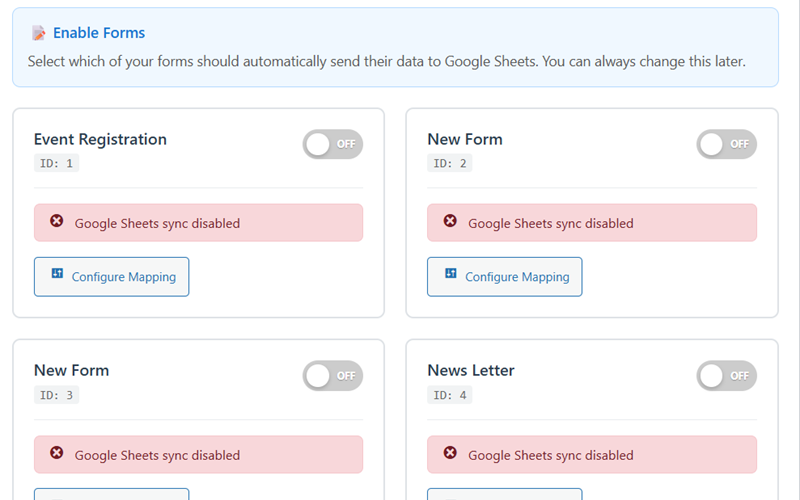
πŸ“‹ Enable Forms Panel
Google Sheets Integration Addon enable forms panel showing per-form ON/OFF toggles for syncing
βš™οΈ Configure Forms & Mapping
Google Sheets Integration Addon configuration screen showing sync mode, data format, and column setup options
Quick Setup Guide

Up and Running in Under 10 Minutes

The addon ships with a step-by-step setup wizard. Most users finish before their coffee gets cold.

1

Setup Service Account

Create a free Google Cloud project and download your JSON credentials file β€” guided every step of the way.

2

Choose Spreadsheet

Select an existing Google Sheet or let the addon create a new one for you. Share it with the service account email.

3

Configure & Enable

Toggle which forms to sync, map your fields to columns, and choose Real-Time or Batch mode.

4

Submit & Watch

Submit a test entry. Watch it land in your spreadsheet in seconds. You're done β€” forever.

Who Is This For?

Built for Anyone Who Lives in Spreadsheets

If you analyze, share, or report on your form data β€” this integration was built for you.

πŸ“Š

Marketing Teams

Track lead form submissions in real-time. Build live dashboards in Looker Studio or Sheets to see campaign performance the moment data arrives.

πŸ’Ό

Sales Teams

Every contact form submission becomes a new row your reps can claim. No more email forwarding, no more leads lost in inboxes.

🎟️

Event Organizers

Registration forms feed straight into a master attendee sheet. Easy to filter, sort, and share with venue staff or co-organizers.

πŸ“ˆ

Analytics & BI

Pipe form data into Google Sheets and connect it to Looker Studio, Power BI, or any tool that reads Sheets. Real-time analytics, no ETL.

🏒

Agencies

Each client gets their own spreadsheet. Hand over a live link instead of running monthly exports. Clients see leads as they come in.

πŸ“§

Newsletter & Lists

Newsletter signups flow into a Google Sheet you can review, segment, and export to your email tool β€” without exposing personal Google logins.

What Users Say

Trusted by Teams Who Run on Spreadsheets

Real feedback from agencies, marketing teams, and small businesses syncing forms with Google Sheets every day.

β˜…β˜…β˜…β˜…β˜…

"We were paying $30/month for Zapier just to push 200 form submissions a month into a spreadsheet. This addon does the same thing for $19 a year, and it's faster. Switched in an afternoon and never looked back."

JT
Jamie T.
Marketing Director
β˜…β˜…β˜…β˜…β˜…

"The Service Account thing is huge. We had a different connector that broke every time someone left our team. With this one, the credentials are dedicated to the integration β€” onboarding new staff doesn't break anything."

EC
Elena C.
Operations Manager
β˜…β˜…β˜…β˜…β˜…

"Setup took me under 10 minutes thanks to the built-in guide. Once I dropped in the JSON file, every submission started showing up in Sheets within seconds. My Looker Studio dashboards are now properly live."

RP
Rahul P.
Data Analyst
30 DAYS

Try the Google Sheets Integration Risk-Free for 30 Days

If the integration doesn't work for you for any reason within 30 days of purchase, send us a quick email and we'll refund every cent β€” no forms to fill, no questions asked, no hard feelings. We can only build great products by standing behind them completely.

Simple Pricing

One Yearly Price. Unlimited Forms. Unlimited Sync.

No per-task fees. No usage limits. No surprise upgrade prompts. Everything in the addon is yours from day one.

Best Value

Google Sheets Integration

$ 19

per year  Β·  renews annually

Full access to all features, updates, and email support for 12 months.

Unlimited Forms Unlimited Submissions Real-Time & Batch Sync Service Account Auth Custom Field Mapping 1 Year Updates & Support 30-Day Money-Back Guarantee
30-day no-questions-asked refund policy. Zero risk.
FAQ

Frequently Asked Questions

Everything you need to know before you buy.

The Google Sheets Integration Addon automatically sends every form submission from Auto Form Builder to a Google Sheet of your choice, in real-time. You can choose which forms to sync, map your form fields to spreadsheet columns, and let new entries appear as fresh rows the moment they are submitted β€” no manual exports, no copy-pasting, no CSV uploads.
A Service Account is the professional, enterprise-grade method Google recommends for automated workflows. Instead of using your personal Google login (which can expire, be shared, or break when an employee leaves), the integration uses a dedicated set of credentials specifically created for syncing data. It works 24/7 without re-authentication, never expires, is not tied to any individual person, and provides better security because credentials are isolated from human accounts.
Yes. The Enable Forms panel shows every form you have built with Auto Form Builder, each with its own ON/OFF toggle. Activate sync on a per-form basis β€” useful when you want some forms to push to Sheets while others stay private.
Absolutely. Every synced form has a Configure Mapping button that opens a visual mapping interface. You can match any form field to any spreadsheet column, change the column order, exclude fields you don't want, and let the addon auto-create column headers using your form labels.
The default mode is Real-time (Immediate) β€” form data arrives in your Google Sheet within seconds of submission. Batch processing is also supported for high-volume scenarios where you prefer scheduled bulk transfers.
The addon includes a step-by-step Quick Setup Guide right inside your WordPress dashboard. You create a free Google Cloud project, download a JSON credentials file, paste it into the addon, and you're ready to go. Most users complete the entire setup in under 10 minutes β€” and once it's done, you never have to touch it again.
No. The integration works with any free Google account that can create Google Sheets. The Service Account itself is created inside Google Cloud Console using free-tier resources, with no billing required for normal form-syncing usage.
Yes. Every purchase of the Google Sheets Integration Addon is backed by a 30-day no-questions-asked refund guarantee. If you are not satisfied for any reason within 30 days of your purchase, contact our support team and you will receive a full refund β€” no hassle, no forms to fill, no explanations required.
Yes. The Google Sheets Integration Addon is an extension specifically for Auto Form Builder. It requires the Auto Form Builder plugin (free version or premium) to be installed and active on your WordPress site. It cannot be used independently or with other form plugins.

Ready to send your form data straight to Google Sheets?

Set it up once, and let your spreadsheet update itself for life.