
Features
Quiz and Lead Funnels for WordPress
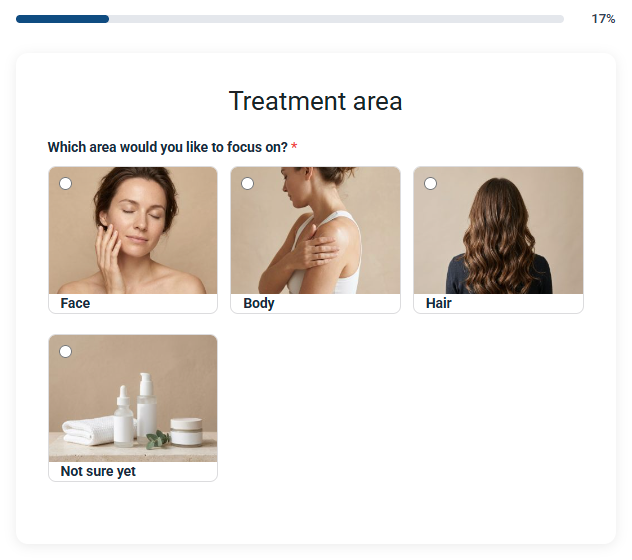
Turn any multi-step form into a funnel that asks one question per screen. Visitors tap a picture answer, move on automatically and see a result that fits their answers. Free in Auto Form Builder.
What you can do
Show one question per screen, with large answer cards that can each show a picture from your Media Library.
Move visitors to the next question as soon as they pick an answer, or turn auto-advance off and show a Next button.
Give each answer a score and show different results by score range, with conditional confirmations or a redirect.
Show the visitor their score in the result message with the {quiz_score} tag. The score is also saved with the entry.
See how many visitors continue or leave on each screen in Form Analytics.
Start from one of four ready-made funnels: Consultation, Home Services Quote, Plan Finder and Real Estate Buyer & Seller.
How it works
- Pick a funnel template under Create Form → Funnels, or open any form and turn on Enable multi-step form and Funnel mode under Settings → Multi-Step Form.
- Use the One question per screen button to place each question on its own screen.
- Select a question and turn on Show options as image cards, then choose an image for each option. Set Auto-advance and, for a quiz, a Score per option.
- Add your result messages under Submission Behavior → Conditional Confirmations, for example one for Quiz score less than 8 and one for Quiz score greater than 7.
- Add the form to a page or a popup and publish. Funnels work on phones, and spam protection appears only on the last screen.
Why it matters
A long form can feel like work. One question at a time, with answers people can simply tap, makes each step quick and clear. Visitors get a result that fits their answers, and you get a lead with the context you need to follow up.
Related features
Related fields
FAQ
Is the funnel feature free?
Yes. Funnels, quiz scoring, picture answers and the four funnel templates are part of the free plugin. There are no paid add-ons.
Do I need to write any code?
No. Everything is set up in the form builder: templates, picture answers, scores and result messages.
Can I show different results for different scores?
Yes. Give each answer a score, then add conditional confirmations for score ranges. Each range can show its own message or redirect to a different page, and {quiz_score} works in messages, emails and redirects.
Can I see where people stop?
Yes. With the Form Analytics add-on on, the Funnel Drop-off report shows how many visitors reached, continued and left on each screen over the last 30 days.
Does it work on phones and in popups?
Yes. Answer cards fit the screen on phones, and a funnel can run inside a popup. You can also place more than one funnel on the same page.
Can visitors check their answers before submitting?
Yes. Turn on the review step and visitors see all their answers, with links to edit them, before they submit.