
In the West, we say “John Smith”—given name first, family name last. In much of Asia, it’s the opposite: “Smith John” puts the family name first. If your forms assume everyone uses Western name order, you’re confusing—and potentially offending—a significant portion of the world. In this guide, you’ll learn about international name formats and how to create forms that work for users from any culture. Structure: Given Name + Family Name Example: John Smith Structure: Family Name + Given Name Example: 山田 太郎 (Yamada Tarō) The labels “First Name” and “Last Name” assume Western order: For Eastern name order users: Example: Japanese user Tanaka Hanako Sees form asking: Possible responses: Label: “Full Name” or “Name” Pros: Cons: Best for: Simple contact forms, newsletters Labels: Pros: Cons: Best for: International forms, global audiences Let users choose their format: Then adjust field order or interpretation accordingly. Pros: Cons: If collecting country: Pros: Cons: Auto Form Builder supports different name formats: Select the appropriate format: Change field labels as needed: For simplicity: Some cultures use single names: Solution: Don’t require both fields; allow single name entry. Spanish-speaking cultures often have two family names: Solution: Allow longer family name field or multiple fields. Icelandic names don’t use family names: Solution: Flexible fields, don’t assume family name inheritance. Some Indian names include: Solution: Allow flexibility, don’t force structure. Many East Asians adopt Western names: Solution: Consider “Preferred Name” field. When showing names: Alphabetical sorting by family name is common: Prefer “Given Name” and “Family Name” over “First” and “Last”: Allow flexibility: If you just need a name for greeting: Clarify what you’re asking: Have people from different cultures try your form: Don’t auto-correct or reformat: One name field—no order confusion. Clear labels plus preference option. Family name first (common in formal contexts). “Given Name” is more internationally accurate. “First Name” assumes Western name order. For global audiences, “Given Name” and “Family Name” are clearer. With clear labels (Given Name/Family Name), this is less likely. If using First/Last, some Eastern name order users may reverse their names to fit. For simple forms (newsletters, contact), yes. For systems needing to address people properly or sort alphabetically, separate fields are better. Allow Unicode characters. Names may include accents (José), umlauts (Müller), non-Latin scripts (田中), and more. Don’t strip or convert these. Include optional middle name field, or allow multiple given names. Some cultures don’t use middle names at all. Handling international name formats: Names are deeply personal and culturally significant. A form that assumes everyone uses Western name order alienates half the world. By using clearer labels, offering flexibility, or simplifying to a single field, you create forms that welcome everyone. Auto Form Builder supports multiple name formats—Western, Eastern, and Formal—plus customizable labels. Create name fields that work for your audience, whether local or global. Ready for internationally-friendly forms? Download Auto Form Builder and configure name fields that respect every culture.International Name Formats: Western vs Eastern Name Order
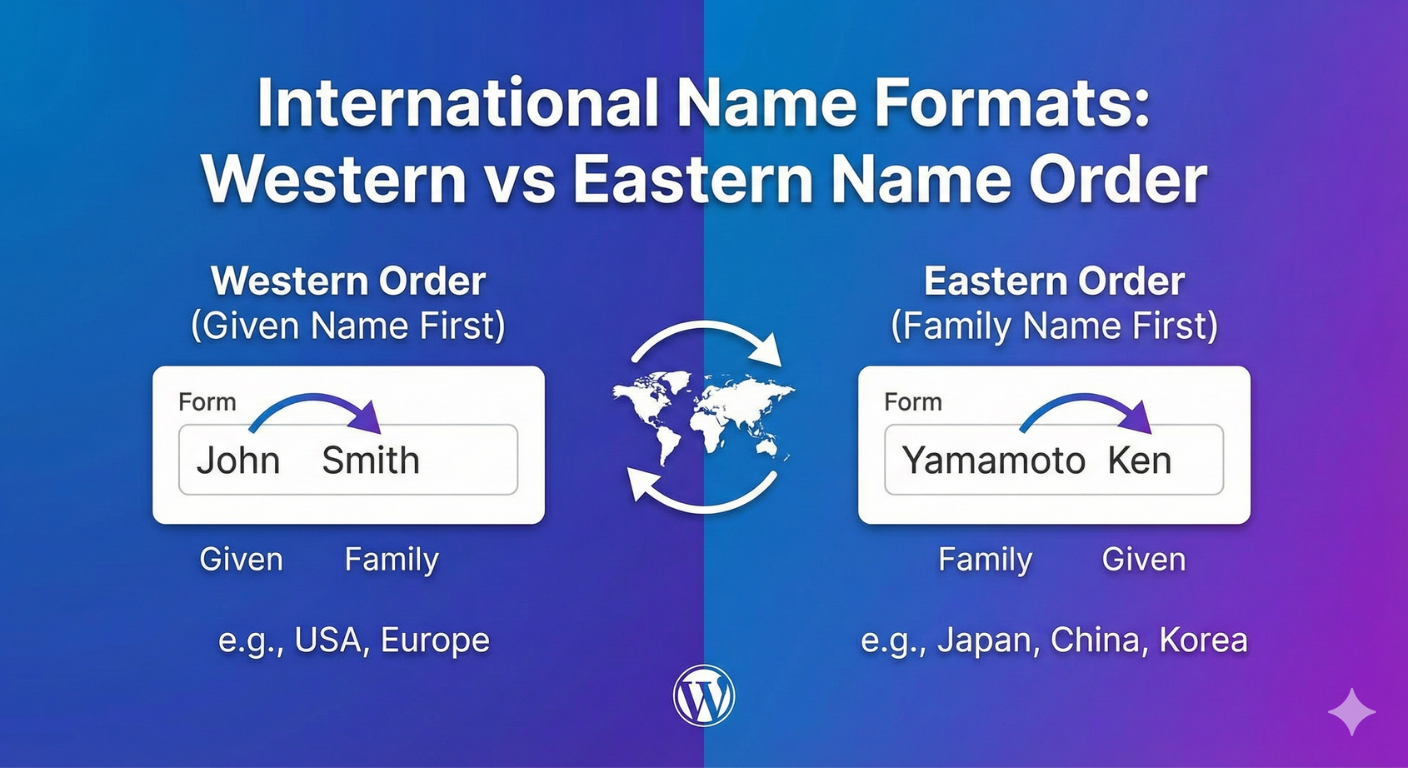
Understanding Name Order Differences
Western Name Order
Eastern Name Order
Why It Matters
Name Order by Region
Western Name Order (Given + Family)
Region
Countries/Examples
North America
USA, Canada, Mexico
Western Europe
UK, France, Germany, Spain, Italy
Australia/NZ
Australia, New Zealand
South America
Brazil, Argentina, Chile
Most of Africa
Nigeria, South Africa, Kenya
Middle East
Most countries (with variations)
South Asia
India, Pakistan (generally)
Eastern Name Order (Family + Given)
Region
Countries/Examples
East Asia
China, Japan, Korea, Vietnam
Southeast Asia
Cambodia, parts of others
Hungary
Eastern European exception
Examples by Country
Country
Order
Example
Family Name
Given Name
USA
Western
John Smith
Smith
John
UK
Western
Emma Watson
Watson
Emma
China
Eastern
李明 (Li Ming)
Li (李)
Ming (明)
Japan
Eastern
田中 花子 (Tanaka Hanako)
Tanaka
Hanako
Korea
Eastern
김민수 (Kim Minsu)
Kim (김)
Minsu (민수)
Vietnam
Eastern
Nguyễn Văn An
Nguyễn
An
Hungary
Eastern
Nagy István
Nagy
István
The Problem with “First Name / Last Name”
Confusing Labels
Real-World Confusion
Better Approaches for International Forms
Option 1: Single Full Name Field
Option 2: Given Name / Family Name Labels
Option 3: Name Format Selection
Option 4: Country-Based Adaptation
Configuring Name Fields in Auto Form Builder
Step 1: Add Name Field
Step 2: Choose Name Format
Western Format
Eastern Format
Formal Format
Step 3: Customize Labels
Step 4: Consider Single Field Option
Special Cases and Variations
Mononyms (Single Names)
Multiple Family Names
Patronymic Names
Religious/Caste Names
Name Changes in International Context
Database and Display Considerations
Storage Strategy
Option A: Separate Fields
Option B: Single Field + Components
Display Logic
Sorting
Best Practices for International Name Fields
1. Use Unambiguous Labels
2. Don’t Force Structure
3. Consider Single Field for Simple Needs
4. Add Help Text
5. Test with International Users
6. Respect What’s Entered
Examples of Inclusive Name Forms
Simple Contact Form
Account Registration (International)
Formal Application
Frequently Asked Questions
Should I use “First Name” or “Given Name”?
What if users enter names in wrong order?
Is one name field enough?
How do I handle names with special characters?
What about middle names?
Summary
Conclusion


Learn how conditional logic improves form conversion rates. Discover why shorter, personalized forms get more completions and better quality leads.

Learn how to add range sliders to WordPress forms. Create interactive number selection with visual sliders for budgets, ratings, quantities, and more.

Learn conditional logic best practices for WordPress forms. Create better user experiences by showing relevant fields and hiding unnecessary ones.

Learn when to use international vs local address presets in WordPress forms. Choose the right address format for your audience and shipping needs.

Learn how to create form sections using HTML blocks in WordPress. Organize long forms with headings, dividers, and visual groupings for better UX.
Discover why conditional logic is essential for WordPress forms. Boost conversions, collect better data, and create personalized user experiences.

Learn how to add a date picker to WordPress forms. Create user-friendly date selection with calendars, format options, and date restrictions.
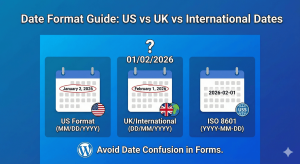
Learn about date format differences between US, UK, and international standards. Choose the right format for your WordPress forms and global audience.

Learn how to add a 'Select All' option to checkbox lists in WordPress forms. Let users quickly select every option with one click for better UX.

Learn how to create searchable dropdown fields in WordPress forms. Help users quickly find options in long lists with type-to-search functionality.
