
Docs
Help center for Auto Form Builder
Review Step Before Submitting
The review step shows visitors a summary of their answers before they send the form. They can go back and change anything, so you get fewer mistakes on long forms and orders. It works on single-page forms, multi-step forms and funnels.
Turn on the review step
- Open your form in the builder and click the Settings tab.
- Open Submission Behavior.
- Tick Show a review step before submitting.
- Optional: write a Text above the summary, for example “Please check your details before sending.” Leave it empty to show only the heading.
- Optional: change the Review button text. Leave it empty to use “Review your answers”.
- Click Save Form.
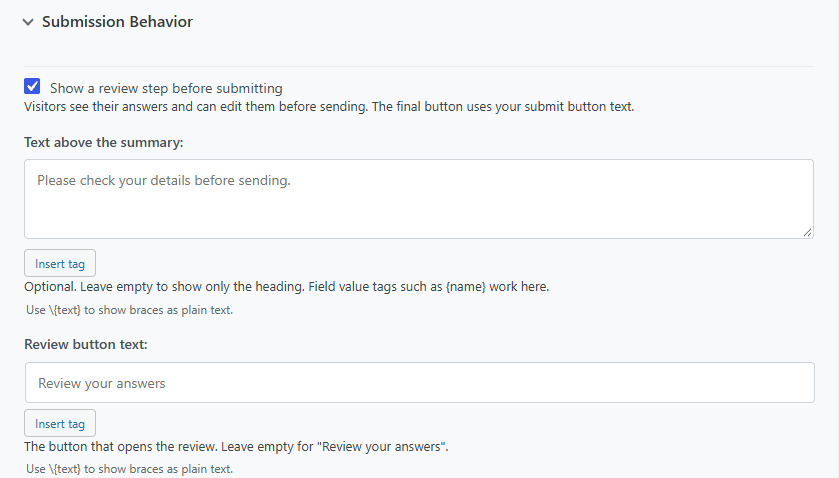
Both text boxes accept field tags such as {name}, so the text can include the visitor’s own answers. See Answer tags.
What visitors see
Instead of the submit button, the form shows the review button. When the visitor clicks it, they see:
- the heading Review your answers and your text above the summary, if you added one
- each question with the visitor’s answer
- an Edit answers link that takes them back to the form, with their answers kept
- a Back button and the final button, which uses your submit button text
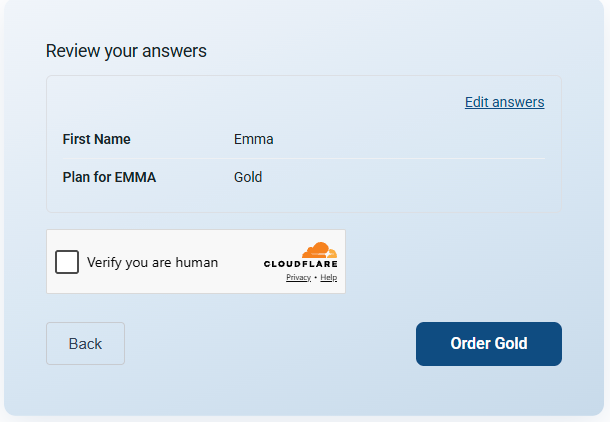
If the form has spam protection such as Cloudflare Turnstile, it appears on the review screen. Password answers are shown as dots, never in plain text.
Tips
- On a multi-step form, the review screen counts as one more step in the progress bar.
- The final button keeps your submit button text, so a clear label such as “Send my request” works well.
- To show a different message after sending, use the Success Message or conditional confirmations in the same Submission Behavior section.
Related
Updated
Was this helpful?